Sitecore Pricing, License Cost, and TCO: Why Enterprises Reassess Their CMS
Sitecore Pricing, License Cost, and TCO: Why Enterprises Reassess Their CMS Sweta Choudhary For many enterprises, the decision to move away from Sitecore does not start with dissatisfaction alone. It often starts with cost visibility. Sitecore has long been used by enterprises that need advanced content management, personalization, digital marketing, and customer experience capabilities. For marketing-led digital teams, it can be a strong platform. But as digital ecosystems grow, the total cost of ownership can become harder to manage. Licensing, implementation, infrastructure, upgrades, integrations, support, and partner dependency can all influence the real cost of running Sitecore over time. That is why many organizations are not only asking, “What does Sitecore cost?” They are asking a more important question: Is Sitecore still the most practical platform for our long-term digital experience strategy? Quick answer: How much does Sitecore cost? Sitecore does not publish standard public pricing for most enterprise CMS and DXP products. Pricing is typically quote-based and depends on the products selected, annual visits or usage, number of sites, deployment model, environments, add-on modules, integrations, support needs, and implementation complexity. As a broad planning estimate, enterprises should expect Sitecore licensing to start in the tens of thousands of dollars per year and scale into six figures annually for larger or more complex environments. The full total cost of ownership is usually higher because it also includes implementation, hosting or cloud services, development, upgrades, integrations, partner support, internal administration, and long-term maintenance. For this reason, the better question is not only “What is Sitecore pricing?” It is “What will Sitecore cost to run, extend, support, and scale over the next three to five years?” Sitecore Pricing and Cost Breakdown The final cost of Sitecore varies by organization, but most enterprise budgets include the following cost areas: Cost Area What It Includes Why It Affects TCO Sitecore license or subscription Core CMS or DXP products, usage entitlements, selected modules, and contract terms This is the base platform cost and usually scales with usage, product scope, and enterprise requirements Implementation Discovery, architecture, design, frontend development, backend development, templates, components, workflows, and testing Larger websites, multi-site estates, and complex content models increase delivery effort Hosting or cloud infrastructure Cloud hosting, managed services, CDN, databases, search, monitoring, security, and non-production environments Traditional Sitecore setups may require significant infrastructure management Add-on products and modules Content Hub, CDP, Personalize, Search, Connect, OrderCloud, DAM, marketing automation, commerce, or AI capabilities Costs increase when the platform expands beyond core CMS Integrations CRM, ERP, DAM, PIM, analytics, identity, marketing tools, commerce systems, and data platforms Custom integrations increase development, testing, and maintenance effort Upgrades and modernization Version upgrades, cloud migration, refactoring, compatibility fixes, and reimplementation of customizations Older or heavily customized Sitecore environments can make upgrades expensive Support and maintenance Partner support, bug fixes, security patches, performance tuning, monitoring, release management, and admin support Enterprise teams often need ongoing specialist support Internal team effort Developer dependency, content operations, governance, training, and platform administration Even when licensing is predictable, internal operating cost can remain high This is why Sitecore pricing should not be evaluated as a license line item alone. For most enterprises, the real cost is the total cost of ownership across licensing, implementation, operations, upgrades, and ongoing change. Typical Sitecore Cost Ranges Enterprises Should Plan For Exact Sitecore pricing requires a vendor quote. However, enterprises can use broad planning ranges to understand budget exposure before starting a renewal, upgrade, or platform comparison exercise. Enterprise Scenario Typical Cost Expectation What Usually Drives the Cost Smaller enterprise CMS setup Tens of thousands of dollars per year Limited number of sites, simpler CMS needs, fewer integrations, lower usage Mid-size Sitecore implementation Six-figure annual platform cost is possible Multiple sites, higher traffic, more environments, personalization, partner support Complex enterprise DXP ecosystem Hundreds of thousands in total annual or first-year cost is possible Multi-brand, multi-region, high traffic, DAM, CDP, commerce, custom integrations, migration, and support The first-year cost is usually higher than the recurring annual cost because it includes implementation, migration, design, development, testing, infrastructure setup, and governance work. Over a three-year period, the largest TCO drivers are often not the license alone. They are usually upgrades, support, integrations, technical debt, partner dependency, and the effort required to launch new digital experiences. What Factors Determine Sitecore License Pricing? Sitecore license pricing can vary significantly because enterprise environments are rarely identical. The final quote may depend on a combination of commercial, technical, and operational factors. Common Sitecore pricing factors include: Product selection, such as XM, XP, XM Cloud, Content Hub, CDP, Personalize, Search, Connect, Send, OrderCloud, or Stream Number of websites, brands, business units, or regional properties Traffic volume, usage levels, or visitor capacity Number of production and non-production environments Hosting model, such as self-managed, managed cloud, or SaaS Number of users, roles, editors, marketers, developers, or administrators Content volume, asset volume, and storage needs Personalization, analytics, search, commerce, or marketing automation requirements Integration requirements with CRM, ERP, DAM, PIM, identity, analytics, and commerce tools Security, compliance, access control, audit, and governance requirements Support tier, partner involvement, and managed services needs Contract duration, renewal terms, and usage overage conditions This is why two enterprises using Sitecore can have very different cost structures. One may be running a focused marketing website. Another may be running a large multi-site, multi-language, integrated digital ecosystem with portals, personalization, DAM, commerce, and regional publishing workflows. Sitecore XM, XP, XM Cloud, and Product Pricing Considerations Sitecore pricing also depends on which products are included in the architecture. Enterprises should understand the difference between pricing for the core CMS and pricing for the broader Sitecore ecosystem. Sitecore XM Pricing Sitecore Experience Manager, or XM, is generally focused on content management and experience management. For organizations that mainly need website content management, this may be simpler than a broader DXP setup. However, cost still depends on the number of sites, environments, traffic, implementation complexity, integrations, hosting model, and support requirements. Sitecore XP Pricing Sitecore Experience Platform, or XP, historically added more
Liferay vs Sitecore: Which DXP Is Better for Enterprise Websites and Portals?
Liferay vs Sitecore: Which DXP Is Better for Enterprise Websites and Portals? Rishabh Varshney Choosing between Liferay and Sitecore is not only a CMS decision. For enterprise teams, it is a digital experience platform decision. Both platforms can support enterprise-grade digital experiences. But they are built around different strengths. Sitecore has traditionally been strong for marketing-led digital experiences, personalization, campaign execution, and content-driven engagement. Liferay, on the other hand, is often a stronger fit when enterprises need websites, portals, workflows, integrations, and authenticated user experiences working together. So the real question is not “Which platform is better?” The better question is: Which platform is better for your operating model? Sitecore: strong for marketing-led experiences Sitecore is often selected by organizations that want advanced personalization, content targeting, campaign management, and marketing-led experience delivery. It can be a strong choice when: Marketing personalization is the main priority Campaign performance is central to the platform strategy The organization has mature digital marketing operations The team has Sitecore expertise or a strong Sitecore partner The digital ecosystem is focused mainly on public websites and campaign experiences For teams where the website is primarily a marketing engine, Sitecore can offer relevant capabilities. However, as needs expand beyond content and personalization, enterprises may begin to reassess whether the platform is still the right long-term fit. Liferay: strong for complex enterprise digital ecosystems Liferay DXP is often a better fit when the digital experience includes more than marketing pages. It is commonly considered for: Customer portals Partner portals Member portals Supplier portals Supplier portals Enterprise websites Multi-site digital ecosystems Authenticated digital journeys Workflow-heavy content operations Liferay combines CMS, portal, workflow, role-based access, low-code capabilities, and integration flexibility in a unified platform. That makes it especially relevant for organizations where different users need different levels of access, content, services, and permissions. Liferay vs Sitecore: practical comparison Content management Sitecore offers strong content management with a marketing-led focus. Liferay also provides enterprise CMS capabilities, but its strength increases when content needs to connect with workflows, permissions, portals, and business systems. Personalization Sitecore has historically had a stronger reputation for advanced marketing personalization. Liferay also supports personalization, but it is often positioned more around governed, integrated, and role-based experiences. Portals and authenticated experiences This is where Liferay often stands out. If your roadmap includes customer portals, partner portals, member areas, self-service journeys, or secure user dashboards, Liferay can be a more natural fit. Integration Both platforms support integrations, but Liferay is frequently selected when enterprise systems need to be connected into one digital experience layer. Deployment flexibility For enterprises that need flexibility across cloud, self-hosted, SaaS, or hybrid environments, Liferay can be attractive. Cost and complexity Sitecore may require careful planning around licensing, implementation, upgrades, and ecosystem complexity. Liferay may offer a more predictable modernization path for organizations that want fewer moving parts. When Sitecore may be the better fit Sitecore may be better if: Your primary need is advanced marketing personalization Your website is campaign-led You already have mature Sitecore operations Your team is committed to Sitecore’s cloud direction Your roadmap is mainly marketing experience optimization When Liferay may be the better fit Liferay may be better if: You need portals and authenticated experiences Governance and workflows are important You need to support multiple digital properties You want stronger integration flexibility You want to reduce developer dependency for content operations You need a platform that supports both internal and external digital experiences How AIMDek can help AIMDek helps enterprises compare their current Sitecore implementation against future-state Liferay possibilities. This includes assessing content models, templates, workflows, integrations, infrastructure, user roles, and migration risks. Evaluating Liferay vs Sitecore? AIMDek can help you assess whether migrating from Sitecore to Liferay is the right move Plan your Sitecore to Liferay migration skip render: ucaddon_next_prev_post
AWS Application Migration Services: When to Rehost, Replatform, or Modernize Legacy Applications
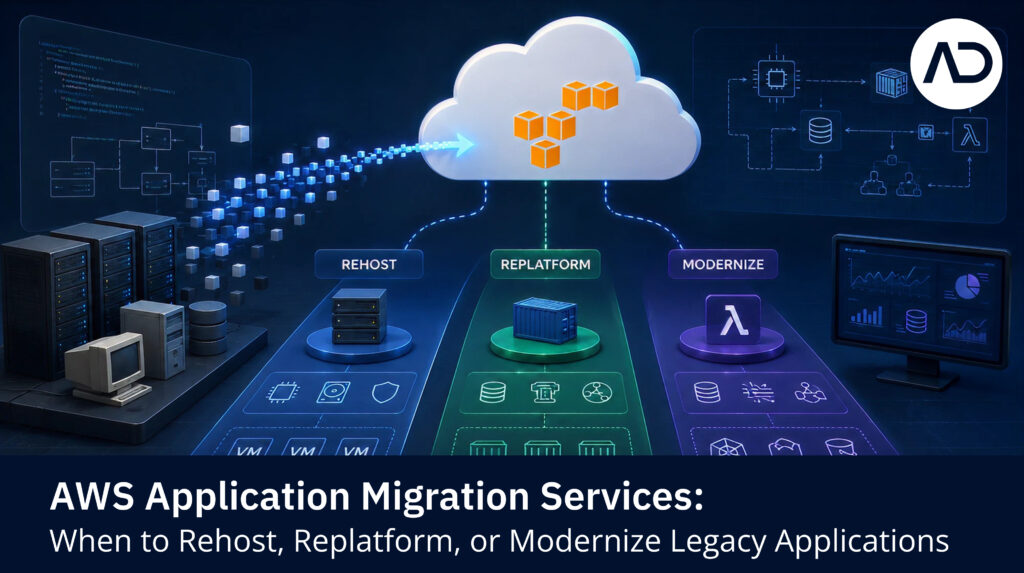
AWS Application Migration Services: When to Rehost, Replatform, or Modernize Legacy Applications Manav Patel AWS application migration services help organizations move applications from on-premise infrastructure, virtual machines, physical servers, or other cloud environments to AWS. But application migration is not only about moving servers. Applications have dependencies, databases, integrations, security requirements, performance needs, and business users. If those details are missed, migration risk increases. AWS Application Migration Service, also known as AWS MGN, is designed as a highly automated lift-and-shift solution for migrating applications to AWS. AWS states that it can replicate source servers into your AWS account and support migration of physical, virtual, or cloud servers. That makes it useful for many rehost migrations. But rehost is not always the right answer for every application. Quick Answer: What Are AWS Application Migration Services? AWS application migration services include the assessment, planning, migration, testing, and optimization activities needed to move applications to AWS. This may involve: Application discovery Server and dependency mapping AWS target architecture planning Rehosting applications Replatforming selected components Database migration Testing and validation Cutover and rollback planning Post-migration optimization Modernization roadmap creation The best approach depends on the application’s business value, technical complexity, and future roadmap. Rehost: When Lift-and-Shift Makes Sense Rehosting means moving an application to AWS with minimal changes. It is often called lift-and-shift. Rehost may be suitable when: The application is stable Downtime tolerance is limited The business needs faster data center exit The application does not need immediate modernization The team wants to reduce migration complexity The workload can be optimized after migration This approach can help organizations move faster, especially when many servers need to be migrated. However, rehosting may also carry existing technical debt into AWS. That is why rehost should be treated as one possible strategy, not the default for everything. Replatform: When Small Changes Create Better Cloud Value Replatforming means making limited changes to improve cloud fit without fully rebuilding the application. Examples include: Moving a self-managed database to Amazon RDS Replacing file storage with Amazon S3 Using managed monitoring and logging Updating deployment pipelines Adjusting application configuration for AWS Improving backup and recovery design Replatforming is useful when small changes can improve manageability, scalability, availability, or cost. It usually requires more planning than rehosting, but less effort than full refactoring. Refactor or Modernize: When Legacy Systems Need Deeper Change Refactoring or re-architecting involves making significant changes to the application. This may be needed when: The application is difficult to maintain The architecture limits scalability Release cycles are slow The codebase has high technical debt The business needs new digital capabilities The application must support APIs, analytics, or AI use cases The current architecture creates operational risk Modernization may include microservices, containers, serverless architecture, event-driven design, managed databases, DevOps automation, or API-led integration. This approach is more complex, but it can create stronger long-term business value. How to Decide the Right Migration Path Use a workload-by-workload decision model. Question What It Helps Decide Is the application business-critical? Migration priority and risk control Is the architecture stable? Rehost vs replatform vs refactor Are there major dependencies? Wave planning Is downtime acceptable? Cutover strategy Is the database complex? Data migration approach Is the application near end-of-life? Retain, retire, or replace Is modernization needed soon? Replatform or refactor roadmap The right migration strategy should be based on technical reality and business priority. Common Application Migration Risks Application migration can fail or slow down when teams miss: Hidden dependencies Hardcoded configurations Legacy operating systems Unsupported software versions Database compatibility issues Licensing constraints Performance assumptions Weak testing coverage Missing rollback plans Poor user acceptance validation This is why application-aware planning matters. Migrating the server is only one part of the work. Where AWS Application Migration Service Fits AWS Application Migration Service can help automate and simplify rehost migration by replicating source servers and supporting cutover to AWS. It is especially relevant for: Physical server migration Virtual machine migration Large-scale lift-and-shift migration Data center exit programs Faster migration of compatible workloads But organizations still need readiness assessment, dependency mapping, landing zone planning, testing, rollback planning, and post-migration optimization. Tools support migration. Strategy controls risk. How AIMDek Helps With Application Migration to AWS AIMDek helps organizations plan and execute application migration to AWS with a focus on risk, continuity, and modernization readiness. Support can include: Support can include: Dependency mapping Migration strategy selection Server and VM migration planning Database migration coordination AWS target architecture Testing and rollback planning Security and governance alignment Post-migration optimization Modernization roadmap planning How AIMDek Supports Moving to AWS Cloud AIMDek helps organizations assess, plan, and migrate workloads to AWS through a phased approach focused on business continuity, security, governance, cost visibility, and modernization readiness. The goal is not only to move infrastructure. The goal is to help you move with control. If you are evaluating migration from on-premise to AWS, start with an AWS Migration Readiness Call. Book an AWS Migration Readiness Call with AIMDek. Manav Patel Manav Patel is an experienced Cloud and Infrastructure Consultant specializing in cloud architecture, infrastructure modernization, platform migration, DevOps automation, and enterprise system reliability. He has extensive experience in designing and deploying scalable, secure, and highly available cloud-native environments across cloud and microservices ecosystems using technologies such as Kubernetes, AWS, Infrastructure as Code (Terraform & Cloud formation), containerization, CI/CD automation, and enterprise monitoring solutions. FAQs What are AWS application migration services? AWS application migration services help organizations assess, plan, move, test, and optimize applications when migrating to AWS. What is AWS Application Migration Service? AWS Application Migration Service, or AWS MGN, is an AWS service for automated lift-and-shift migration of applications and servers to AWS Should legacy applications be rehosted or modernized? It depends. Stable applications may be rehosted first. Applications with scalability, maintainability, or performance issues may need replatforming or modernization. What is the main risk in application migration? The main risk is missing dependencies between applications, databases, integrations, users, and infrastructure. skip render: ucaddon_next_prev_post
Sitecore Alternative for Enterprise CMS: When Liferay Makes More Sense
Sitecore Alternative for Enterprise CMS: When Liferay Makes More Sense Rishabh Varshney Enterprises usually search for a Sitecore alternative when the platform no longer feels aligned with how the business needs to operate. This does not always mean Sitecore is the wrong platform. It may still be effective for organizations focused heavily on marketing-led personalization and campaign experiences. But for many enterprises, digital experience now goes beyond marketing websites. They need customer portals, partner portals, member dashboards, intranets, regional websites, content workflows, integrations, secure access, and role-based experiences. That is where Liferay often becomes a serious Sitecore alternative. Why companies look for Sitecore alternatives Common reasons include: It can be a strong choice when: Increasing platform cost Complex upgrades Developer dependency Difficulty managing multiple websites or portals Integration challenges Need for authenticated user journeys Limited flexibility in the current implementation Pressure to modernize legacy Sitecore XP environments Need for better governance and workflow control The goal is not always to find a cheaper CMS. The goal is often to find a platform that better supports the organization’s future digital model. Why Liferay is a strong Sitecore alternative Liferay DXP is designed for enterprises that need to manage complex digital ecosystems. It brings together: Enterprise CMS Portal capabilities Role-based access Workflows Low-code tools Integration flexibility Multi-site support Content governance Authenticated experiences This makes Liferay a good fit when content is only one part of the larger digital journey. When Liferay makes more sense than Sitecore Liferay may be a better fit when your organization needs to support multiple user groups through one platform. For example: Customers need secure self-service access Partners need a dedicated portal Members need personalized resources Employees need an intranet Regional teams need localized content control Marketing teams need reusable templates Business users need workflows without developer support IT teams need integration flexibility In these cases, the platform must act as more than a CMS. It must become a digital experience layer across the organization. Where Sitecore can still be strong Sitecore may still be the better option when advanced marketing personalization is the main priority. It can be a strong fit for organizations that need: Campaign-focused content delivery Advanced audience targeting Marketing-led digital journeys Deep personalization Existing Sitecore expertise Continued investment in the Sitecore ecosystem That is why the decision should not be based only on feature comparison. It should be based on business priorities. Sitecore replacement should be treated as modernization Replacing Sitecore is not just a platform swap. A proper Sitecore replacement strategy should include: Content audit Template and component review Workflow mapping Integration assessment SEO migration planning User role definition Portal roadmap Data and analytics migration Governance model redesign Post-launch optimization This is where migration planning becomes critical. How AIMDek can help AIMDek helps enterprises evaluate Liferay as a Sitecore alternative and build a phased migration roadmap. Our team supports discovery, platform planning, content migration, workflow implementation, integration development, QA, launch, and post-migration support. Looking for a Sitecore alternative? AIMDek can help you assess whether Liferay is the right platform for your next stage of digital growth. Learn how AIMDek can help skip render: ucaddon_next_prev_post
Liferay Migration Services: How Enterprises Move Websites and Portals to Liferay DXP
Liferay Migration Services: How Enterprises Move Websites and Portals to Liferay DXP Rishabh Varshney Migrating to Liferay DXP is not only about moving content into a new CMS. For enterprises, Liferay migration often includes websites, portals, user roles, workflows, integrations, assets, templates, permissions, and business processes. That is why a successful Liferay migration needs a structured roadmap. Whether you are moving from Sitecore, Adobe Experience Manager, Drupal, WordPress, a legacy CMS, or a custom portal, the migration should be planned around business continuity and long-term scalability. Why enterprises migrate to Liferay Organizations usually consider Liferay when their current platform cannot support the next stage of digital growth. Common migration drivers include: Need for customer or partner portals Need for better workflow and governance Legacy CMS limitations Developer dependency for content changes Complex integrations High platform maintenance effort Multi-site or multilingual requirements Need for role-based authenticated experiences Desire to consolidate websites and portals Liferay is often attractive because it can support both public-facing websites and secure digital experiences within one platform. What does Liferay migration include? A Liferay migration can include several workstreams. 1. Website migration This includes migrating public website pages, landing pages, blogs, resources, metadata, media, and SEO elements into Liferay. The goal is to preserve search visibility while improving content management for business users. 2. Portal migration For customer, partner, member, or employee portals, migration usually includes: User roles Permissions Authentication Dashboards Forms Documents Documents Self-service journeys Business system integrations Portal migration requires more planning than a standard website migration because user access and business rules are involved. 3. Content and asset migration Content migration should include: Content audit Content cleanup Metadata mapping Asset library migration Component mapping Redirect planning Localization mapping Review and approval process This is also a good opportunity to simplify outdated content structures. 4. Workflow and governance setup Liferay supports workflow-driven content operations. This is useful for organizations with multiple teams, geographies, business units, or approval layers. A migration should define: Author roles Reviewer roles Publisher roles Approval workflows Versioning needs Content ownership Governance rules 5. Integration migration Most enterprise platforms connect with other systems. Common integrations include: CRM ERP DAM Identity provider Analytics Marketing automation Payment systems Search Event platforms Internal databases A good migration plan identifies which integrations should be rebuilt, replaced, simplified, or retired. 6. QA and launch readiness Before launch, teams should validate: Page rendering Mobile responsiveness Forms Workflows Permissions Integrations Redirects Metadata Analytics Performance Accessibility Security Liferay migration should not go live until both content and business-critical workflows are validated. How AIMDek can help AIMDek provides Liferay migration services for enterprise websites and portals. We help teams migrate from legacy CMS and DXP platforms to Liferay with a practical approach covering planning, architecture, content, integrations, workflows, QA, and post-launch support. Planning a move to Liferay DXP? AIMDek can help you build and execute a migration roadmap for websites, portals, and enterprise digital experiences. Explore AIMDek’s Liferay Services skip render: ucaddon_next_prev_post
Sitecore Content Migration Checklist for Enterprise Websites

Sitecore Content Migration Checklist for Enterprise Websites Rishabh Varshney Sitecore content migration is one of the most important parts of a replatforming project. If it is rushed, the new platform may inherit the same content problems, outdated templates, broken links, poor SEO structure, and workflow gaps from the old system. A strong migration should not simply move everything from Sitecore to the new platform. It should clean, structure, and improve the content experience. Why content migration needs planning Enterprise Sitecore implementations often include years of accumulated pages, media files, templates, components, forms, campaign pages, personalization rules, and regional content. Some of this content is business-critical. Some of it is outdated. Some of it may not be used at all. Without a proper audit, teams risk migrating unnecessary complexity into the new CMS or DXP. Sitecore content migration checklist Use this checklist before migrating content from Sitecore to Liferay or another enterprise platform. 1. Content inventory Identify all existing content types, including: Website pages Landing pages Blogs News posts Case studies Case studies Forms Product pages Event pages Media files Documents Regional pages Language variants Mark each item as migrate, update, merge, archive, or delete. 2. URL and SEO audit Before migration, review: Current URLs Page titles Meta descriptions H1 tags Canonical tags Image alt text Internal links Sitemap structure Structured data Redirect requirements Create a redirect map before development begins. This helps protect search rankings after launch. 3. Template and component mapping Sitecore pages may depend on custom templates and components. Document: Page templates Reusable components Custom modules Layout structures Personalization rules Dynamic content blocks Forms Navigation components Then decide which should be rebuilt, simplified, merged, or removed. 4. Media and digital asset migration Review all assets before migration. Check: File names Duplicate assets Unused assets Image sizes Document versions Alt text Metadata Asset ownership Folder structure A cleaner asset library makes the new platform easier to manage. 5. Workflow and permission mapping Identify how content is created, reviewed, approved, and published today. Map: Authors Editors Reviewers Publishers Publishers Regional owners Legal or compliance reviewers Approval stages Publishing rules This helps configure better governance in the new platform. 6. Forms and integrations Forms are often overlooked during migration. Review: Contact forms Lead generation forms Event registration forms Newsletter forms Gated content forms CRM-connected forms Custom submission workflows Confirm where data goes, who receives alerts, and how submissions are tracked. 7. Analytics and tracking Before migration, document: Analytics tools Tracking scripts Conversion events Form goals Campaign tags Heatmaps Pixels Reporting dashboards After launch, validate that analytics are firing correctly. 8. Post-migration validation After migration, test: Page accuracy Broken links Redirects Metadata Forms Search Navigation Mobile responsiveness Page speed Workflow approvals Permissions Analytics This final validation is critical before launch. How AIMDek can help AIMDek helps enterprises migrate Sitecore content to Liferay with a structured approach covering content audit, SEO preservation, template mapping, workflow setup, QA, and launch support. Need help planning Sitecore content migration? AIMDek can help you migrate from Sitecore to Liferay without carrying unnecessary complexity into the new platform. Learn how AIMDek can help with your migration skip render: ucaddon_next_prev_post